Custom Software vs Off-the-Shelf: Which Fits Your Business?
Compare custom and off-the-shelf software for business. Weigh workflow fit, setup, ownership, integrations and long-term costs before choosing a system.
On this page12 sections
If a ready-made system already does what your business needs, use it. There is no need to spend more just to say that your software is custom.
But if your staff keep exporting Excel files, calculating things separately and entering the same order twice, look at what that “cheap” system is really costing you.
The monthly fee is only one part. Your team's time is another.
This article explains when buying an existing system makes sense, and when building around your own process can be the better investment.
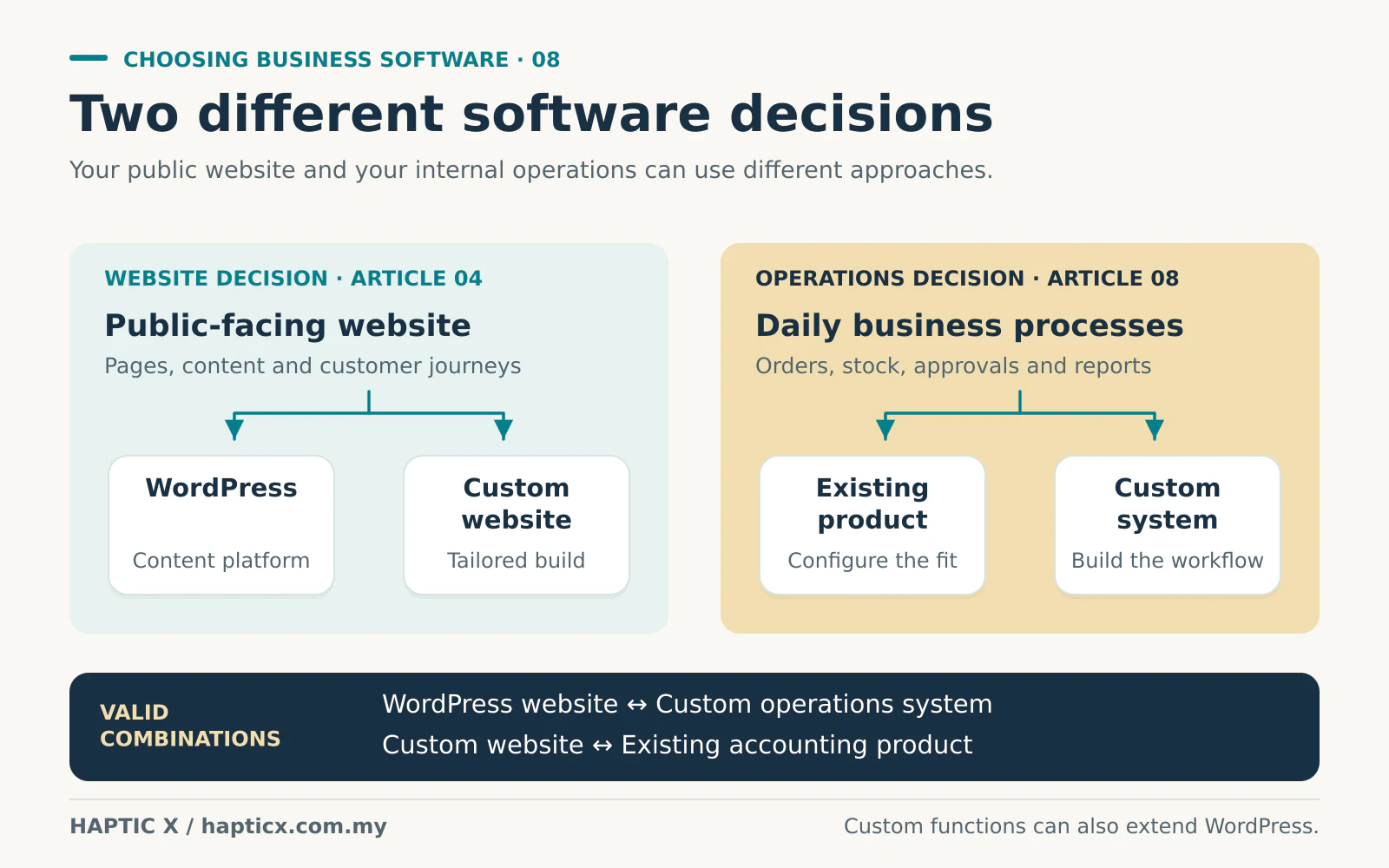
Is this the same as WordPress versus a custom website?
They are related decisions, but they cover different things.
WordPress versus a custom website is mainly about how your public website is built.
Here, we are talking about the work behind the business: quotations, stock, customer records, job approvals, purchasing, commissions and reports. Should you use an existing ERP, CRM or other software product, or build a system for your company's way of working?
You can have a WordPress website and a custom internal system. You can also have a custom website connected to an existing accounting product. Each part should earn its place.
Think about the layout of a factory
A standard production setup can work very well when your products and process fit it. You buy the equipment, arrange the stations and train the team.
But suppose your job needs an artwork check, then a sample, then the customer's approval before production can begin. Your materials, pricing and delivery arrangements may also change for every order.
Now imagine forcing that process into a factory layout designed for something else. Staff walk back and forth. Someone keeps a separate notebook. Another person remembers which customer has approved which version.
Custom software is like arranging the workstations around the process you actually need. It can reduce unnecessary movement between departments and make the next step clear.
You still need a sensible process first. Customising a confusing workflow just gives the confusion its own software.
What does “off-the-shelf” mean in everyday language?
It means the product already exists. Many companies use it, and you choose a plan and configure the available settings.
Some are installed on your computer. Others run online and are paid for monthly or annually. You may see the term SaaS: it means software provided as an online service.[1]
Custom software is built around agreed requirements. You decide what the users need to do, and the team designs the system to support that work.
The difference is how closely you can shape the process, and what you must pay to do so.
Try your own job before choosing a system
Take a printing business as an example. This is an illustration, not a client case study.
A customer asks for 2,000 boxes. Sales calculates the price from size, material and quantity. The customer changes the artwork. Production needs the final approved version. Finance needs to know the deposit has arrived before the job starts.
An existing product may handle all of that well. If it does, excellent.
If it only records a customer name and a total price, staff may still handle the important work in WhatsApp and spreadsheets. The software looks organised, but the actual job is happening somewhere else.
Ask the supplier to demonstrate your whole example, including the change of artwork and the deposit. That tells you much more than a dashboard with attractive charts.
When we would tell you to buy an existing product
We would usually start there when your process is common, your budget is limited and the available product covers the important work comfortably.
A simple retail business may need ordinary sales, stock and receipts. A small team may need customer contacts and follow-up reminders. Rebuilding those familiar functions may not bring enough benefit.
Existing software can also help when you need to begin quickly and are still learning how the business should operate.
Before signing up, check what happens when:
- You add more staff or another branch.
- You need a report that is not included in the basic plan.
- You want to connect your website or accounting system.
- You decide to leave and export your records.
That is how you find the real price of the package.
Where custom software can make your day easier
Custom development becomes more useful when the details of your process matter.
Your staff see the work relevant to them
Sales may need quotations and follow-ups. The warehouse needs confirmed orders and stock. Finance needs payments and outstanding amounts.
You can design the screens and permissions around those jobs, instead of asking everyone to work through the same crowded interface.
One entry can support several departments
A confirmed quotation can become an order. An approved order can tell the warehouse what to prepare. The delivery update can tell the customer what is happening.
That is a practical benefit: fewer people copying the same details into different places.
Your pricing and approvals can match your business
Different customer prices, quantity discounts, manager approvals and job-specific requirements can be part of the agreed system.
Staff should not need a second spreadsheet just to apply the rules correctly.
You can decide what comes next
Once the foundation is sound, you can add a customer portal, branch workflow or another agreed function. You are planning around your business, rather than waiting for a standard product to release the exact feature you need.
Those benefits depend on the work being properly designed and delivered. Ask the developer to demonstrate them using your examples.

Does paying once make custom software cheaper?
You may pay once to build an agreed function, instead of paying a separate subscription for that feature every month or year. Whether that happens depends on your contract and the components used.
That can be valuable, especially when a standard system charges for additional users, modules or connections.
But custom software still runs somewhere. Hosting, backups, security work, support and paid external services can continue. Future features also need time to develop.
Compare the full cost over the same period. Here is a fictional three-year example:
| Cost item | Existing product | Custom system |
|---|---|---|
| Setup or initial development | RM3,000 | RM30,000 |
| Monthly software or care allowance | RM700 × 36 = RM25,200 | RM400 × 36 = RM14,400 |
| Three-year total before other costs | RM28,200 | RM44,400 |
In this example, the custom system costs RM16,200 more over three years. It needs to save enough work or solve an important enough problem to justify that difference.
Now include the work that is missing from both invoices. How many hours do staff spend copying information? How often does the boss need to check an incorrect report? What happens when the one person who understands the spreadsheet is on leave?
A proper comparison includes those questions.
You can keep the software that already works
You do not have to replace everything.
For example, keep the accounting system your Finance team understands. Build the quotation or production workflow around your own needs, then connect the two where it is worthwhile.
An API is the connection that lets systems pass agreed information between them. Before paying for that connection, check whether the existing product allows it, what access costs and what happens when a transfer fails.
A useful integration should reduce manual work. It should also tell someone when something needs attention.
Cheap to buy can be expensive to keep fixing
Imagine making another change every two weeks because staff cannot complete an ordinary job. Each time, you explain the problem, wait, test again and perhaps pay another bill.
The cost is not only the amendment fee. It is your time and the work your staff cannot finish.
You get what you pay for when the quotation includes understanding the process, proper testing, useful training and a clear handover. A larger number on an invoice does not prove quality; the agreed work does.
Ask who owns the source code, who controls the hosting account and how you can export your business records. You should be able to run your company without depending on one person's memory.
Let the daily problem decide
If an existing product fits, we will tell you. If the same workarounds keep costing time, we can discuss a focused custom software project. Start with the work you want to make easier, then choose what is worth building.
Source
Reviewed 1 November 2026. Cost examples in this article are illustrative calculations, not vendor prices.
[1] Microsoft Azure, What is software as a service?: https://azure.microsoft.com/en-us/resources/cloud-computing-dictionary/what-is-saas
Frequently asked questions
01Is custom software only for big companies?
No. A small company can start with one valuable workflow. The important question is whether the problem is large enough to justify the investment.
02Is custom software always cheaper over time?
No. It can avoid some recurring feature charges and reduce manual work, but development and running costs still matter. Compare your actual requirements.
03Can we begin with an existing product and move later?
Often, yes. Check the export options early. Customer records, transactions, attachments and history should be available in a usable form.
04Must we replace our website to build a custom internal system?
Not necessarily. The public website and the internal system can be separate, with an agreed connection where needed.
05What should we show Haptic X first?
One complete job: the enquiry, quotation, messages, approvals, spreadsheets and final result. Remove private customer details. Show us where the team gets stuck.