ERP vs CRM: Which System Does Your Malaysian Business Need?
Compare ERP and CRM for Malaysian businesses. Understand what each system manages, where they overlap and how to choose based on your daily operations.

On this page10 sections
“Who is following up with this customer?”
“Do we actually have enough stock?”
“Sales promised delivery on Friday. Has anyone told the warehouse?”
If these questions keep coming back to the owner, the problem may be the way information moves through the company. ERP and CRM are two types of software that can help with different parts of that work.
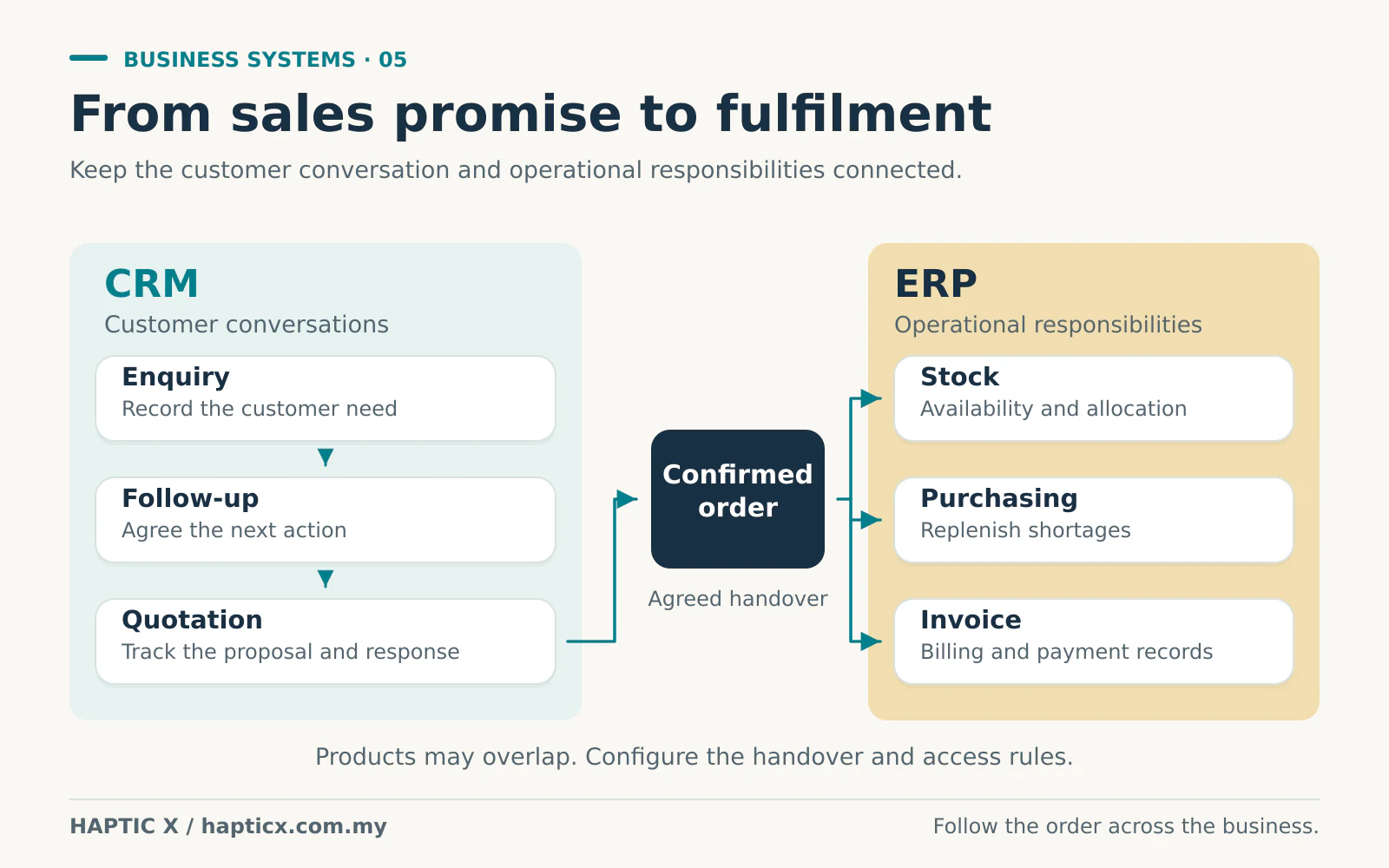
CRM mainly helps your team manage customers and sales follow-up. ERP mainly helps the business coordinate operations such as orders, purchasing, stock and finance. Their functions can overlap, and they can work together.[1][2][3]
You do not have to understand every software term before deciding what to improve. Start with the daily question your team struggles to answer.
CRM: what is happening with this customer?
CRM stands for customer relationship management. Think of it as a shared, organised record of the sales conversation: who the customer is, what they need, who spoke to them and what should happen next.[2]
A customer messages about a product. A salesperson replies and sends a quotation. The customer asks for time to consider it. Three days later, does anyone remember to follow up?
If that information stays only in one person's phone or memory, the owner may have to ask around. If the salesperson is away, another person may repeat the same questions to the customer.
A suitably configured CRM can give the team a place to record the enquiry, attach the quotation, assign responsibility and set the next action. It can help you see which opportunities are still active and which need attention. It does not do the relationship-building for you; your team still needs to use it and follow up properly.
ERP: can the business carry out the order?
ERP stands for enterprise resource planning. The name sounds large, but the practical questions are familiar: what did we sell, what is available, what must we buy and which department needs to act next?[1]
Suppose sales accepts an order. The warehouse needs the items and quantities. Purchasing may need to replenish stock. Finance needs the invoice and payment status. The owner wants to know whether the order is progressing.
If each department keeps a separate sheet and sends updates by message, people can work from different versions of the same order. An ERP is intended to connect operational information and processes so those handovers are easier to manage.[1]
That only works when the system matches your process and the records are maintained. Buying software does not automatically make inaccurate stock numbers correct.
The difference in everyday language
| Question your team asks | Usually the stronger starting point |
|---|---|
| Who contacted this prospect, and when should we follow up? | CRM |
| Which quotations are still being considered? | CRM |
| What has this customer discussed with our sales team? | CRM |
| Do we have the stock to fulfil this order? | ERP |
| What needs purchasing, packing or delivery? | ERP |
| Which operational or financial step is holding up the order? | ERP |
| Can sales see the status of an order after the customer confirms? | A connected process across the relevant functions |
These are typical responsibilities, not rigid borders. An ERP may include CRM functions. A CRM may include quotation or order features. Check the actual product and configuration rather than buying based on the name alone.[3]
Follow one order through a small company
Consider an illustrative equipment distributor. A customer asks for 20 units, but the warehouse currently holds 12. The remaining 8 need to be purchased. This example is fictional; it is not a Haptic X client case study.
1. Sales receives the enquiry
The salesperson records what the customer wants, the proposed date and the next follow-up. That is the customer-conversation side of the work: a natural CRM responsibility.
Before promising delivery, sales needs reliable availability information. If the relevant systems are connected and configured to share it, the salesperson can check the operational record instead of guessing or asking several people.
2. The customer confirms
Now the business has to carry out the promise. Someone confirms the order, reserves the available stock and decides whether a partial delivery is acceptable.
The warehouse should see what to prepare. Purchasing should see the shortage. Finance should see the agreed price and payment terms. These operational steps are where ERP functions can help.
The software must be configured around the actual rules. Does purchasing start immediately or after a deposit? Who approves a special discount? Can sales change the quantity after packing begins? Those decisions affect the build and the daily result.
3. The delivery plan changes
The supplier says the remaining units will arrive later. The useful system does more than store that date somewhere. The right people need to see the change and know who will contact the customer.
ERP information can tell the team what is happening to the order. CRM information can show who owns the relationship and what was already promised. Together, they support a clearer response, provided the integration and responsibilities have been agreed.
4. The customer calls again
Instead of “Let me ask around”, the salesperson should have an agreed way to check the order and record the conversation. The warehouse should not need to read every sales note to find the packing instructions. Finance should not need to search a long chat history to identify the payment.
That is the outcome to design for: the right information reaching the right person at the right stage.
Each person needs a useful view
Giving everyone every screen can create confusion. Start with the job each person does.
Sales needs customer conversations, quotations and relevant order progress. The warehouse needs items, quantities and packing or dispatch tasks. Purchasing needs shortages and supplier orders. Finance needs the appropriate billing and payment records. The owner needs a useful overview and the decisions requiring approval.
Access should follow those responsibilities. A staff member who packs orders does not automatically need permission to change prices or view every financial record. Agree who can view, create, edit and approve each type of information.
These permissions and handovers are part of the functionality. They should be discussed before development, not discovered after everyone starts using the system.

Which one should you start with?
If enquiries arrive but nobody knows who is following up, start by examining the sales process and CRM needs.
If orders are confirmed but stock, purchasing and fulfilment keep getting confused, examine the operational process and ERP needs.
If both problems exist, choose a manageable first phase. You might improve lead and quotation tracking first, or start with one order-to-stock workflow. You do not have to replace every existing tool at once.
For example, an accounting system that already works for the finance team may remain in place. The question becomes whether the new system needs to exchange information with it, and how. Keep a useful tool when there is a clear reason to keep it; replace it when the business case supports the change.
The price follows the functions and connections
A contact list with follow-up reminders is a different scope from a system with multiple warehouses, approval levels, purchasing, sales commissions and external integrations.
An API connection can let systems exchange information. It also needs rules: which system is the main record, what data moves, how often it moves and what happens if a transfer fails. “Integration included” needs a more precise explanation in the quotation.
Compare the initial work and the running costs: licences, hosting, support, data preparation, training and later changes. A cheap setup can be poor value if your team continues retyping information or paying for repeated corrections. A higher price is worthwhile only when the agreed functions, testing and handover justify it.
Also make time for adoption. Someone must clean the starting records, agree the process and show staff how to use it. A screen full of old or inconsistent information will not become reliable simply because it has moved into new software.
Start with one order that causes trouble
Choose a recent example and write down who handled it, where the information went and where the team had to stop and ask questions. That gives us something practical to discuss.
Explore Haptic X's ERP system service for Malaysia or custom software development. Bring the workflow first; the right functions and system boundaries can follow from it.
Sources
Sources checked on 1 November 2026. The distributor example is illustrative and does not describe a measured client outcome.
[1] Microsoft Dynamics 365, What is ERP?.
[2] Microsoft Dynamics 365, What is a CRM system?.
[3] Oracle, CRM vs. ERP: Know the Differences: functional emphasis, permissions and integration.
Frequently asked questions
01Is ERP only for large companies?
No. A smaller business can have operational problems worth addressing. The scope should fit its needs and budget. A limited first phase may be more manageable than trying to introduce every possible module at once.
02Does a CRM replace accounting software?
Do not assume it does. A CRM mainly addresses customer and sales activity, although products vary. Check the accounting functions your business needs and whether an existing system should remain or connect to the new setup.
03Can an ERP include CRM functions?
Yes. Some products cover both areas, and separate systems can also be connected.[3] Evaluate the actual functions and handovers rather than assuming you must buy two products because there are two names.
04Should we stop using WhatsApp?
Not necessarily. It may remain a useful communication channel. Decide which commitments, order changes and follow-up details must also be recorded where the responsible team can find them. Software cannot organise information that nobody records.
05Will a new system fix inaccurate stock immediately?
No. You need a reliable starting count and a clear process for receiving, selling, returning and adjusting stock. The system supports those controls; staff still need to follow them consistently.