Website Redesign Checklist: Content, SEO and Launch Planning
Planning a website redesign? Use this checklist to review content, URLs, redirects, mobile usability and lead forms before your new website goes live.
On this page10 sections
If your website is five to eight years old, open it on your phone and look at it as a new customer. Does it still describe the business you run today?
You may have added new services, changed your product range or started serving different customers. Meanwhile, the website may still show the old photographs and the same short introduction written years ago.
That is a good reason to review it. You do not have to throw everything away. The useful question is which changes will help customers understand your business and make your staff's work easier.
Start with the things customers struggle with
Imagine a company that now supplies and installs equipment. Its website still talks only about selling equipment. Customers will not know installation is available unless they call.
Or take a supplier whose product pages contain only a photo and a model number. The sales team ends up sending the same size chart on WhatsApp every day. A redesign should bring that information onto the page.
Before discussing colours, list the problems:
- Customers cannot tell which service they need.
- Important details are difficult to read on a phone.
- Enquiry forms collect too little information to prepare a quote.
- The website shows old products, staff or contact details.
- Updating a simple page takes too much time.
A clear problem helps you spend on the right work. “Make it look modern” is a starting point, but it does not explain what needs to improve.
Decide whether you need a refresh or a rebuild
If the website works well and the information is useful, a few updated pages may be enough. You may need clearer navigation, better photographs or a more obvious enquiry button.
A larger rebuild makes more sense when the business has changed substantially or the existing setup cannot handle the work you now need. Ask the developer to show the limitation and explain the cost of fixing it.
| What is happening now? | What to investigate first |
|---|---|
| Design looks old, but customers can use it easily | A focused visual and content refresh |
| People struggle to find information or enquire | Navigation, page content and forms |
| You cannot add the features the business needs | Platform limitations and a possible rebuild |
| Services and customers have changed | A new content plan before detailed design |
This conversation can save you from paying for a complete replacement when a smaller job would solve the problem.
Rewrite the explanation, not just the headline
A new design with the same unclear content still leaves the customer guessing.
Look at the main pages and ask: what do we do, who is it for, what is included and how does someone start? Replace vague phrases with real information. “Industrial pump installation and servicing” tells a buyer more than “Solutions for your future,” if that is the service you actually provide.
Give each page a clear job. The homepage helps visitors find the right part of the business. A service page explains that service. A contact page makes it easy to reach the right person.
This also matters for search. Important explanations should appear as readable page text, with sensible headings, rather than only inside a banner image. Google's guidance says ordinary SEO and useful content remain relevant to its AI search experiences; there is no special AI writing format or schema requirement.[1] Clearer information helps explain your business. A visual refresh by itself does not guarantee rankings or AI recommendations.
Keep the useful parts of the old website
Before deleting anything, list the pages that bring enquiries, answer common questions or contain useful product information. Use your available search and enquiry data, then ask the sales team what customers rely on.
An old-looking specification page may still be valuable. Keep the specifications and improve how they are presented. A customer who needs dimensions will not be helped by replacing them with a large decorative photograph.
Save a baseline before work starts: important pages, enquiries, orders and available search traffic. Make sure the tracking works. A blank report does not necessarily mean the website received no enquiries.
Keep page addresses unless they need to change
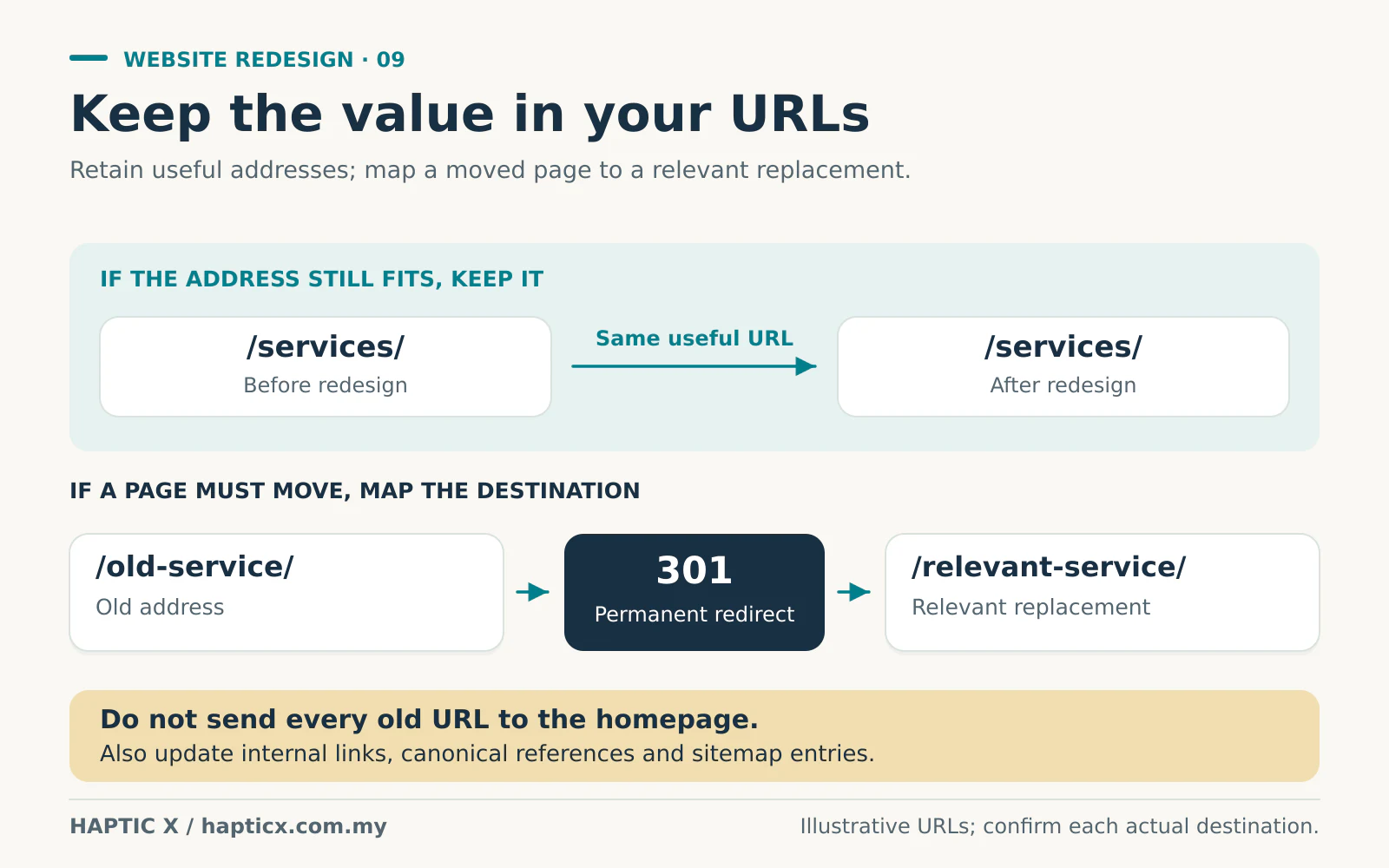
A redesign does not require changing every URL. If a useful page already has a sensible address, keep it.
Where a page must move, ask for an old-to-new list. The old address should lead to the relevant replacement through a permanent redirect, usually a 301 or 308. Google recommends matching destinations and updating internal links, canonical references and the sitemap.[3]
In plain English: someone who opens an old link about valves should reach the relevant valve information. Sending every old link to the homepage makes that person start searching again.
You do not need to configure these settings yourself. Put them in the project scope so somebody is responsible for them.
Test the draft on the devices people actually use
Pick up your phone and complete a normal task. Find a service, compare two products or send a quotation request. Try the form with a missing field and see whether the message helps you fix it.
Check that text is readable, menus are easy to open and floating buttons do not cover important details. Ask the developer to check keyboard access, visible focus, contrast, image descriptions and form labels. W3C's preliminary accessibility checks cover these areas, although a quick check is not a complete assessment.[2]
Test with the real content. A page with one sample photo may behave differently once the full product gallery and documents are added.
Launch when someone is available to check the work
Before the new website goes live, submit every form and confirm that the correct person receives it. Test phone, email and WhatsApp links. For a store, check payments, delivery charges, order emails and refunds within the agreed test scope.
Confirm who can restore the previous version if a serious problem appears. Ask your provider to check that public pages can be accessed by search engines and that restrictions used on the test site have not been carried into the launch.[3]
Finally, let a staff member update a page without the developer doing it for them. That is a useful handover test. You should know how to make everyday changes and whom to contact for work outside your team's role.
Show us where the website is falling behind
Send Haptic X your current website and a few examples of what customers or staff find difficult. Our corporate website service can help scope the redesign, with SEO and AI search requirements considered alongside the content.
Sources
Official guidance checked on 1 November 2026.
- Google Search Central, generative AI optimization guidance: https://developers.google.com/search/docs/fundamentals/ai-optimization-guide
- W3C Web Accessibility Initiative, preliminary accessibility checks: https://www.w3.org/WAI/test-evaluate/preliminary/
- Google Search Central, site moves and URL changes: https://developers.google.com/search/docs/crawling-indexing/site-move-with-url-changes
Frequently asked questions
01Does a five-year-old website automatically need replacing?
No. Review what is outdated and what customers struggle with. A focused improvement may be enough.
02Can we keep the same domain and URLs?
Yes, where they still suit the business. If an address must change, include the relevant replacement and redirect in the plan.
03Should we rewrite every page?
Keep accurate, useful information. Update the parts that are outdated, unclear or missing the answers customers need.
04How do we know the redesign was useful?
Compare the customer tasks and business measures you agreed before starting: useful enquiries, completed orders, easier editing and fewer repeated questions.
05What should we receive at handover?
The agreed account access, editing instructions, renewal details, backup arrangements and a clear support contact.