Website Maintenance Costs in Malaysia: What Are You Paying For?
Review website maintenance costs in Malaysia, including updates, backups, security and support. Learn what to check before choosing a maintenance plan.

On this page8 sections
You have paid to build the website. Why is there another cost to look after it?
Think about your house or shop. You can pay for a good renovation, move in and use everything properly. Later, a tap starts dripping, a light fails or the gate needs attention. The original work still has value. The place also needs care while you use it.
A website is similar. The right maintenance budget depends on what runs inside it, how much it changes and how quickly someone must respond when something fails. RM300 to several thousand ringgit a month can be a planning conversation, but it is not one standard price or a promise that every website fits that range.
Let's make the work behind that fee easier to picture.
Start with the house and shop you already understand

A weak shower, a leaking tap and a blocked toilet
If your shower pressure becomes weak, you want someone to find the cause. Is it the shower head, the water supply or a pipe? Replacing a shiny fitting without checking the problem may leave you with the same weak shower.
A website enquiry form can be like that. The visitor presses “Send”, but your team receives nothing. The cause might be the form, an email setting or a connection to another service. Good maintenance includes diagnosis and a check that the whole journey works again.
A leaking tap is easier to ignore until the wasted water becomes noticeable. A small website error can also sit quietly while enquiries go missing. A blocked toilet is more urgent: it interrupts normal use immediately. In a store, a broken checkout deserves a different response from a slightly misaligned photo. Ask your provider how urgent faults are handled.
The fridge, shop lights and LED sign
A fridge can look fine from outside while failing to keep food cold. Similarly, a homepage can load while the payment process or order notification is broken. Looking at the front page is not a complete check.
Now think about your shop lights and LED sign. A flickering sign may still switch on, but customers struggle to read it. A website can have the same practical problem: tiny mobile text, a menu that will not open or a button hidden by another element. Someone needs to check the parts customers actually use.
Some repairs belong in routine care; replacing the entire sign or changing the whole shop layout is a larger job. Agree that boundary for your website too.
Repainting, the gate and a mouse that stops working
Paint fades, and the business may eventually need a fresh appearance. Updating a banner or contact detail is a small task. Redesigning every page is closer to a full repaint and refit, so it may need its own scope.
The gate has another purpose: controlling access. You would question who still has a key after a staff member leaves. Website administrator accounts deserve the same attention. A working login page is not enough if unnecessary people still have access.
Even your computer mouse can stop clicking properly. The computer still turns on, but the small part you use every day makes the whole job frustrating. A website button, form or checkout can cause the same problem. You do not throw away the whole business because one part fails; you check the cause and repair or replace the right part.
You already accept that a shop needs this kind of attention. Give your website the same practical treatment. Routine care for a small site can be a manageable monthly expense; the budget grows when the system is larger or needs faster support.
What should the monthly work actually include?
Updates and checks. Software changes over time. For a WordPress site, core software, themes and plugins may need updates. WordPress advises backing up before updating.[1] The service should explain how updates are checked, especially around forms, checkout and other important functions.
Backups that can be restored. A backup is useful only if the necessary information is included and recovery works. For WordPress, files and the database both matter.[2] Ask how often backups run, where they are kept and how restoration is handled. An online store taking orders all day has different recovery needs from a rarely changed company profile.
Security and access care. This can include managing accounts, checking software, reviewing alerts and adjusting protection. WordPress describes security as ongoing work across several layers.[3] No responsible maintenance promise can guarantee that every threat will be blocked.
Monitoring and practical support. What gets checked: availability, forms, orders, payment notifications or connections to other systems? Are small content changes included? Who responds, during which hours, and what needs a separate quotation? These details make a plan useful.
Why can one plan be RM300 and another cost thousands?
Because the responsibility can be very different. These are illustrative planning bands, not surveyed Malaysian rates or published Haptic X maintenance packages.
| Example monthly allowance | A possible scope to discuss | The question to ask |
|---|---|---|
| RM300–RM500 | Limited routine care for a simpler website | Which checks and tasks are included, and what is outside the allowance? |
| RM700–RM1,500 | More active care for a business site or store | How much support, testing and content work does the fee cover? |
| RM2,000 to several thousand | More complex operations, integrations or greater support responsibility | Which systems and response commitments must the team maintain? |
These are examples of how scope can change the budget, not specifications for services at those exact prices. Hosting may be included or billed separately. Specialist work or demanding response requirements can exceed the bands.
A quiet company site with a few pages is different from a store connected to payments, stock, delivery and messaging. When one connection changes, the team may need to investigate and test several steps. You are paying for the agreed work and availability, not simply the number of pages.
A traffic spike does not always mean more customers
Suppose your server suddenly records many more requests. Has your advertising worked, or is something repeatedly calling the same page?
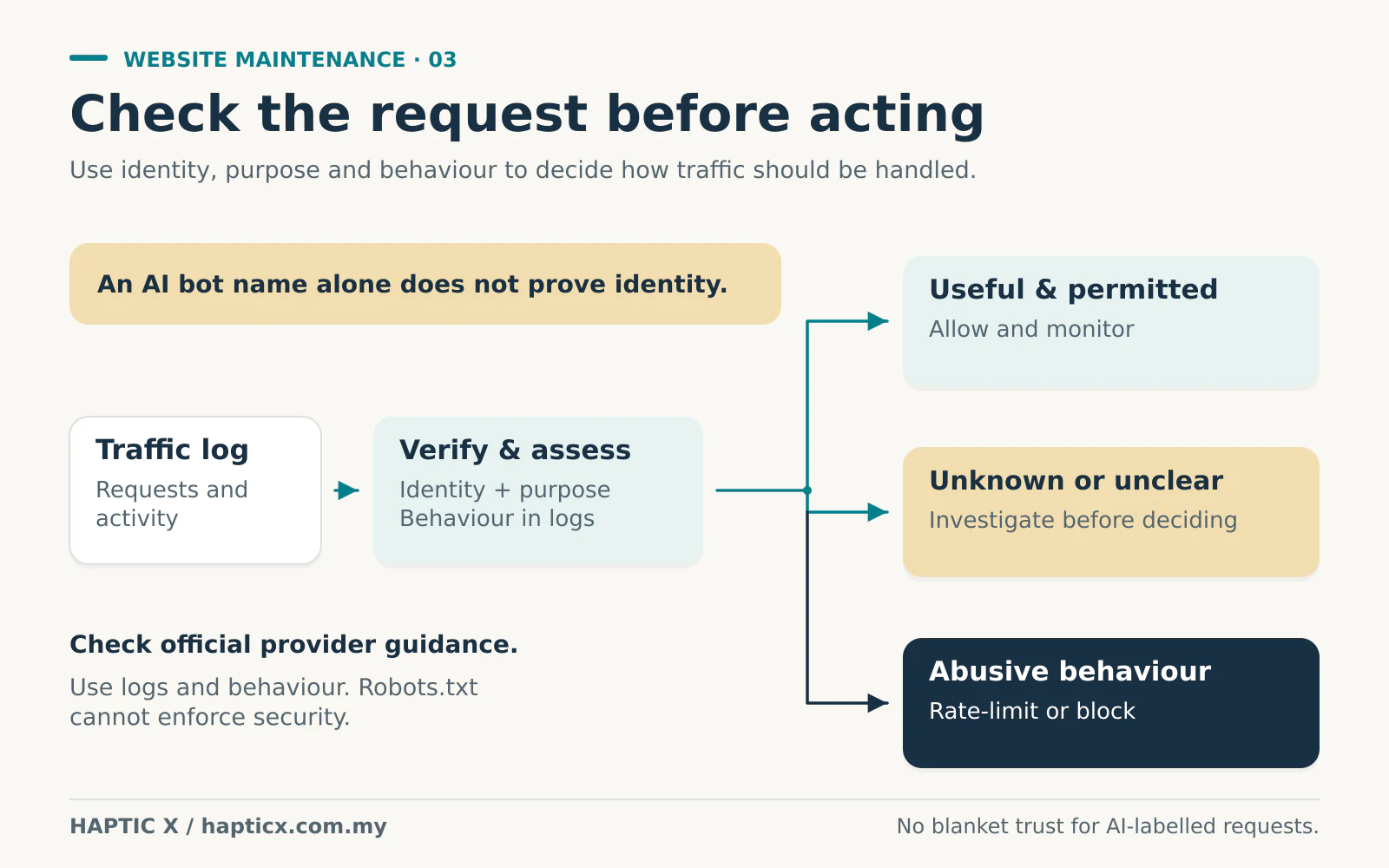
The logs may show people, search crawlers, monitoring tools and harmful automated requests. Server requests are not the same as individual customers. Look at patterns: which addresses and pages are involved, how quickly requests arrive and whether normal customers can still use the site.
Too many automated requests can use up the server's capacity. Pages become slow, forms may time out and real customers may be unable to visit, enquire or buy. It is like a crowd blocking your shop entrance: the activity looks busy, but the customers you want cannot get through. Maintenance helps the team notice that pattern, investigate it and apply suitable controls, such as limiting repeated requests or blocking confirmed abusive traffic. It reduces the problem; it is not a promise that a site can never be attacked.
Googlebot is an example of a useful crawler, but anyone can put a familiar name in a request's user-agent label. Google provides verification methods using published IP ranges or DNS checks.[4] A name alone is not proof of identity.
What about ChatGPT, Gemini and other AI assistants?
An AI question can lead to a legitimate retrieval of online information. ChatGPT may fetch a page for a user, and Gemini can use public Google Search information.[5][6] Search indexing, model training and a user-requested fetch are different purposes; OpenAI documents OAI-SearchBot, GPTBot and ChatGPT-User separately.[5]
Ask the maintenance team to examine behaviour and logs, and check official provider guidance or published IP information where available. A request claiming to be ChatGPT, Gemini or DeepSeek is not automatically genuine. That is not a claim that every provider publishes a verifiable crawler.
Avoid blocking everything with “AI” in its name without understanding the purpose. Decide which legitimate uses you want to allow, while investigating harmful activity. Robots.txt communicates crawler preferences; it cannot force a malicious client to obey.[7] Access controls and traffic protection still need separate attention.
Agree on the small print before you need a repair
Ask for a plain-language list of what the fee covers. Then ask what happens when something breaks.
Is correcting a fault included? How are new requests priced? What happens outside support hours? Who pays an external provider if the problem needs its involvement? Does the team report what it checked and changed?
Also keep business access clear: domain, hosting and important service accounts should have an agreed owner and handover arrangement. Maintenance should make the website easier to manage, rather than leave you unsure who controls it.
The cheapest plan may be enough for a limited need. It may also be a poor fit if every necessary task becomes an extra bill. Compare the actual responsibility, not just the monthly figure.
Match the maintenance to the website's job
Tell us how your website supports the business, which systems it connects to and what would happen if it stopped working. That gives a clearer starting point than choosing a fee before discussing the responsibility.
Use Haptic X's corporate website service page to start a conversation about the website and the ongoing care it needs. Ask for a defined scope that your team can understand.
Sources
Sources checked on 1 November 2026. Budget bands are illustrative planning allowances, not surveyed rates or published Haptic X maintenance packages.
[1] WordPress, Updating WordPress.
[2] WordPress Developer Resources, Backups.
[3] WordPress Developer Resources, Hardening WordPress.
[4] Google, Verify requests from Google crawlers and fetchers.
[5] OpenAI, Overview of OpenAI Crawlers: separate search, training and user-triggered agents, with published IP lists.
[6] Google Gemini Apps Help, Use and manage Connected Apps in Gemini: use of public Google Search information.
[7] Google Search Central, Introduction to robots.txt: limitations of voluntary crawler instructions.
Frequently asked questions
01Do I need maintenance if I rarely change the website?
A site can stay visually unchanged while its software and connected services change. The amount of care can be modest for a simpler site, but someone should still be responsible for checks, backups and access.
02Is hosting the same as website maintenance?
No. Hosting provides the environment where the website runs. Application updates, content work, fault investigation and support depend on the agreement. Some providers bundle services, so ask what is included rather than relying on the label.
03Can I handle maintenance myself?
You can if you have the time and knowledge to perform the work and recover from problems. Check that you can restore a backup and test the important functions. Decide who takes responsibility when the issue is beyond your experience.
04Will restoring a backup recover every recent order?
Not necessarily. Orders received after the backup may need separate recovery or reconciliation. Ask about backup frequency and how recent transactions would be protected during a restore; avoid assuming a daily backup means no possible data loss.
05Does maintenance include a redesign?
Only if your agreement says so. Small content changes and a complete visual rebuild are different amounts of work. Ask where routine care ends and a separately quoted project begins.